Chapter Three: MIDI
6. MIDI Data Format: Channel Mode Messages
Channel mode messages are intended to control the overall function of ALL voice channels of an instrument. The MIDI 1.0 Specification intended that instruments be designed to operate only under one mode at a time. Channel mode messages use controller numbers 120–127 and are sent on the receiving instrument's basic channel. An instrument's programmable parameter set should include a basic channel setting. This means that you may have a number of the same model of instrument set to different basic channels, paying attention only to the channel mode messages sent on their particular basic channel.
The channel mode messages fall into six types: OMNI, MONO/POLY, ALL NOTES OFF, LOCAL CONTROL, ALL SOUND OFF and RESET ALL CONTROLLERS. OMNI, if set ON, instructs all instrument voices to respond to any and all received channel voice messages regardless of what channel they are sent on. This would be equivalent to your TV set displaying all cable channels simultaneously.
MONO/POLY modes determine whether notes are played polyphonically, several at once (POLY), or monophonically, one at a time on each voice (MONO; see below). A new NOTE ON message in MONO mode ends the previous note and begins the new note. You may wish to set your synth to MONO mode if you want to use a patch with portamento (a continuous glide in pitch from one note to the next).
1011nnnn 0ccccccc 0vvvvvvv
n=basic channel, c=controller numbers 120–127, v=value (see the table below).
The full implementation is:
| Status Byte | Data Byte 1 | Data Byte 2 | Description |
|---|---|---|---|
| 1011nnnn | 01111000 (120) | 00000000 (0) | All Sound Off |
| 1011nnnn | 01111001 (121) | 00000000 (0) | Reset All Controllers |
| 1011nnnn | 01111010 (122) | 00000000 (0) = off 01111111 (127) = on |
Local Control |
| 1011nnnn | 01111011 (123) | 00000000 (0) | All Notes OFF |
| 1011nnnn | 01111100 (124) | 00000000 (0) | Omni Mode OFF (all notes off as well) |
| 1011nnnn | 01111101 (125) | 00000000 (0) | Omni Mode ON (all notes off as well) |
| 1011nnnn | 01111110 (126) | 0mmmmmmm (m=number of channels)* |
Mono Mode ON (Poly Mode OFF, all notes off as well) |
| 1011nnnn | 01111111 (127) | 00000000 (0) | Poly Mode ON (Mono Mode OFF, all notes off as well) |
*A special case: m=0 tells the instrument to assign its voices one per channel, starting with the basic channel and continuing up through channel 16 or until it runs out of voices.
There are four OMNI-MONO/POLY mode combinations:
| Mode | Omni | POLY/MONO | Result |
|---|---|---|---|
| 1 | ON | POLY | Messages are received from all channels and assigned to all voices |
| 2 | ON | MONO | Messages are received from all channels and control one voice monophonically |
| 3 | OFF | POLY | Messages are received only on a specified channel, but are assigned to all voices |
| 4 | OFF | MONO | Messages are received on a specified number of channels, starting with the basic channel, and each channel controls its own monophonic voice |
Drawn for an instrument with four voices and its basic channel set to 1; the dot is where incoming notes are pooled and handed out to the voices.
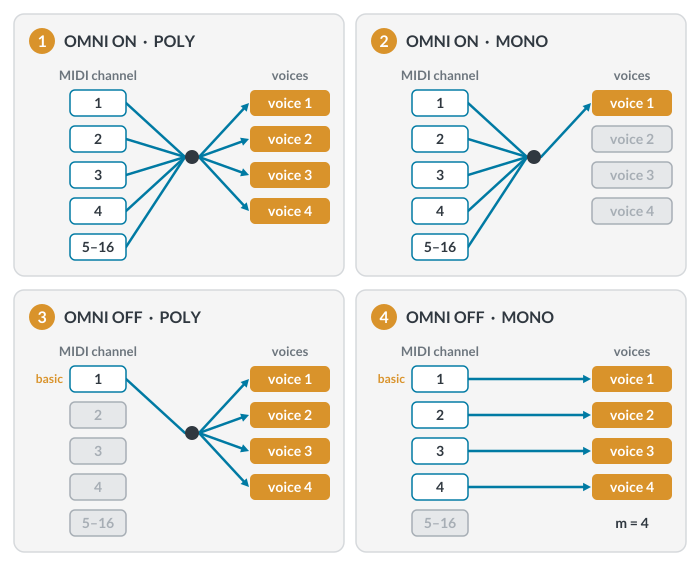
Mode 4 is the only one that listens on several channels at once while keeping them apart, one voice per channel.
ALL NOTES OFF is useful for sequencing programs, where a missed NOTE OFF message may leave a note 'hanging,' sounding indefinitely. This is equivalent to the PANIC button on many synths and DAWs.
The original 1983 specification reserved controllers 122–127 for channel mode messages. Two more were added later. ALL SOUND OFF (120) silences everything sounding on the channel at once, including release tails and notes held by the sustain pedal, which ALL NOTES OFF leaves ringing. RESET ALL CONTROLLERS (121) returns pitch bend, modulation, sustain and similar performance controllers to their defaults, though by convention not volume or pan. A PANIC button typically sends one or both along with ALL NOTES OFF.
LOCAL CONTROL (on/off) is designed to separate the MIDI-generating keyboard function of a synth/sampler from its sound-producing capability. This is useful when you want only notes returning from a computer to cause the instrument to sound, avoiding a common problem of doubled notes. With LOCAL CONTROL off, notes and other data are still sent to the MIDI OUT port.
The same setup in both panels, with MIDI thru turned on in the sequencer; only the LOCAL CONTROL setting changes.
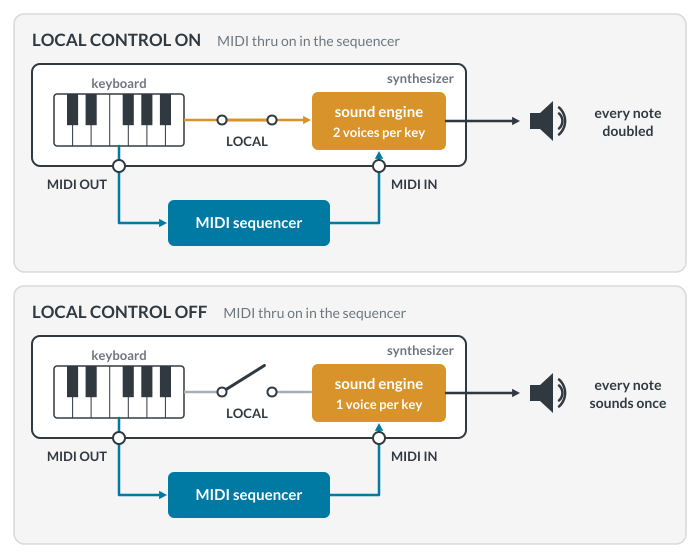
Sequencers, including the MIDI tracks of every DAW, have a MIDI thru setting (Patch Thru in Digital Performer) that routes the notes you play on the keyboard back to the instrument. With LOCAL CONTROL on, each note then sounds twice, once locally and once returning from the sequencer, producing a sort of flanged sound; it also robs your instrument of half its polyphony, since each note you play uses two voices. Normally, LOCAL CONTROL is best set on the instrument itself, not through MIDI.
LOCAL CONTROL matters only for an instrument that is both a keyboard and a sound source, such as a synthesizer, workstation or digital piano. Many setups today pair a controller keyboard, which makes no sound of its own, with software instruments in a DAW. There, the same MIDI thru setting that doubles notes on a hardware synth is what lets you hear what you play at all, and there is no LOCAL CONTROL to turn off.
Most current hardware synths and virtual instruments are multitimbral: each of the 16 channels plays its own sound, polyphonically. This arrangement, often called Multi mode, is one the four original modes did not anticipate, and many instruments simply ignore OMNI and MONO/POLY messages. The one-voice-per-channel idea behind Mode 4 lives on in MPE (MIDI Polyphonic Expression), which gives each sounding note its own channel so it can carry its own pitch bend and pressure (see the Update on the channel voice messages page).
