Chapter Three: MIDI

4. MIDI Data Format: Channel Voice Messages
Almost all MIDI devices are equipped to receive MIDI messages on one or more of 16 selectable MIDI channel numbers. A device's particular voice (or patch, program, timbre) will respond to messages sent on the channel it is tuned to and ignore all other channel messages, analogous to a television set receiving only the station it is tuned to and rejecting the others. The exception to this is OMNI mode. An instrument set to receive in OMNI mode will accept and respond to all channel messages, regardless of the channel number.
The most common MIDI messages are the channel voice messages, listed in the chart below. They convey information about whether to turn a note on or off, what patch to change to, how hard the keys are being pressed (called aftertouch), etc.
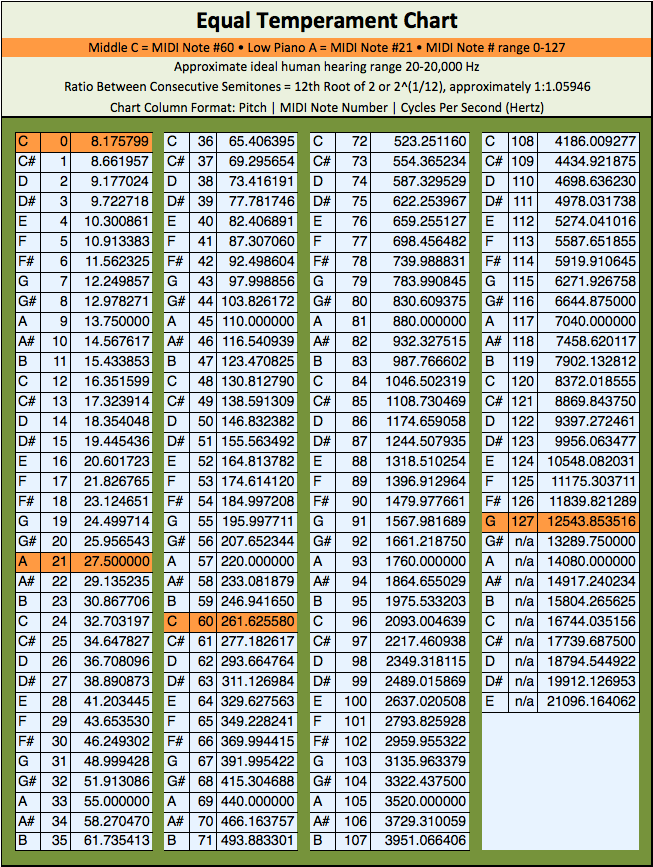
| This table presents a summary of the MIDI channel voice message codes in binary form. A MIDI channel voice message consists of a status byte followed by one or two data bytes. To read the chart, note that each letter (n, k, v, p, c, f) holds the place of a bit whose purpose is described in the Legend column. See this chart of pitch-to-MIDI note numbers. See the list of currently assigned MIDI controller numbers. |
||||
|---|---|---|---|---|
| Status Byte | Data Byte 1 | Data Byte 2 | Message | Legend |
| 1000nnnn | 0kkkkkkk | 0vvvvvvv | Note Off | n=channel* k=key # 0–127 (60=middle C) v=velocity (0–127) |
| 1001nnnn | 0kkkkkkk | 0vvvvvvv | Note On | n=channel k=key # 0–127 (60=middle C) v=velocity (1–127; 0 = Note Off) |
| 1010nnnn | 0kkkkkkk | 0ppppppp | Poly Key Pressure | n=channel k=key # 0–127 (60=middle C) p=pressure (0–127) |
| 1011nnnn | 0ccccccc | 0vvvvvvv | Controller Change | n=channel c=controller v=controller value (0–127) |
| 1100nnnn | 0ppppppp | [none] | Program Change | n=channel p=program number (0–127) |
| 1101nnnn | 0ppppppp | [none] | Channel Pressure | n=channel p=pressure (0–127) |
| 1110nnnn | 0fffffff | 0ccccccc | Pitch Bend | n=channel c=coarse f=fine (c+f = 14-bit value; 8192 = no bend) |
Every row of the chart follows the same pattern. The status byte always begins with a 1. Its first four bits, the most significant nibble (MSN), name the type of message (1001, for example, means Note On), and its last four bits, the least significant nibble (LSN), shown as nnnn, give the channel. The data bytes that follow always begin with a 0, which leaves seven bits for a value from 0 to 127: a key number, a velocity, a controller value and so on.
Channel Numbers Are Off by One
The four channel bits count from 0, so channel 1 is sent as binary 0000 (decimal 0) and channel 16 as 1111 (decimal 15). Instruments and software show channels as 1–16; the number in the bits is always one less.
Here is a complete message, taken apart byte by byte.

Play a Loud Middle C!
This message plays middle C on MIDI channel 5 as loudly as possible, with the maximum velocity of 127. Each byte is shown in binary, decimal and hexadecimal.
| Status Byte | Data Byte 1 | Data Byte 2 | |
|---|---|---|---|
| Binary | 10010100 | 00111100 | 01111111 |
| Decimal | 148 | 60 | 127 |
| Hex | 94 | 3C | 7F |
- Status byte: 1001 = Note On; 0100 = 4, which means channel 5.
- Data byte 1: 60 = middle C (labeled C3 in some programs and C4 in others).
- Data byte 2: 127 = the maximum velocity.
Manuals and MIDI monitor apps (like those on the previous page) usually show messages in hexadecimal, or hex, as in the card's Hex row. Hex is base 16: it counts 0–9 and then A–F (see Chapter Five). Each hex digit stands for exactly one nibble, so 94 reads directly as 9 = Note On, 4 = channel 5, and 3C works out to 3 × 16 + 12 (C) = 60.
Notice that nothing in the message says how long the note lasts. MIDI note messages carry no rhythmic durations, so the note sounds until a message turning off the same note number on the same channel arrives.
Simultaneous events in MIDI must be sent as a string of serial commands. A 3-note chord, for example, will be transmitted as three separate Note On messages. At MIDI's 31,250 bits per second, each three-byte message takes just under 1 ms, so the whole chord arrives in about 3 ms and is normally heard as simultaneous.
However, as polyphonic instruments (those capable of playing more than one note simultaneously) gained more voices, and MIDI setups grew to include more and more instruments and tone modules, large simultaneous events became susceptible to glitches, unwanted arpeggiation and data errors: the interface's processor could work only so fast, and the serial line could carry only so much data. The serial-line limit belongs to the original 5-pin DIN connection; over USB, which most setups now use, MIDI 1.0 data travels far faster than 31,250 bits per second.
Running Status
To make more efficient use of the limited bandwidth, MIDI's designers built in a shortcut called running status. Running status allows a single status byte's action to remain in effect for any number of messages that follow, each sent as its data bytes alone, until a different status byte arrives. For example, to play three 'simultaneous' notes on the same MIDI channel, a Note On status byte can be sent, followed by six data bytes representing three key-number/velocity pairs. The code stream below would play a C major chord, in seven bytes instead of nine:
| Status Byte | Key 1 (C) | Velocity 1 | Key 2 (E) | Velocity 2 | Key 3 (G) | Velocity 3 |
|---|---|---|---|---|---|---|
| 10010100 | 00111100 | 01111111 | 01000000 | 01111111 | 01000011 | 01111111 |
| 148 (Note On, ch. 5) | 60 | 127 | 64 | 127 | 67 | 127 |
To get the most out of running status, MIDI lets a Note On with a velocity of zero count as a Note Off: sent for a key that is already sounding, it turns that note off. The Note On status still in effect from turning the notes on does both jobs, so no Note Off status bytes are needed. So, a chord turned on and then off would look like:
| Status Byte | Key 1 Vel. 1 | Key 2 Vel. 2 | Key 3 Vel. 3 | Key 1 Vel. 0 | Key 2 Vel. 0 | Key 3 Vel. 0 |
|---|---|---|---|---|---|---|
| 10010100 | 00111100 01111111 | 01000000 01111111 | 01000011 01111111 | 00111100 00000000 | 01000000 00000000 | 01000011 00000000 |
| Note On, ch. 5 | key 1 on | key 2 on | key 3 on | key 1 off | key 2 off | key 3 off |
This shortcut saves the most in a melody, where notes start and stop by turns: with separate Note Off messages the status byte would change every time, while with velocity-zero Note Ons every message after the first needs only its two data bytes.
Key Velocity
Many instruments transmit and respond to key velocity, the speed at which a key is depressed. Some even respond to the speed at which a key is released, which is why the Note Off message has a velocity data byte (release velocity). The velocity-zero Note On shortcut described above gives this up: its velocity byte has to be 0, so it has no room for a release velocity.
How an instrument responds to key velocity depends on how it has been programmed. Most simply, velocity controls the note's dynamic. A particular patch may become too loud in one range, usually the upper one, so many instruments allow velocity scaling across the keyboard. Most also let you choose a velocity curve, which sets how strongly the sound responds to playing harder. Some instruments or patches can alter timbre or spatial location through velocity. Sampling instruments now commonly crossfade or switch between two or more different sounds, called velocity layers, based on the speed of a keystroke. For example, a piano patch may switch among three samples for each note, recorded soft, medium and loud, since a real piano's timbre changes with velocity. The most detailed sampled pianos use many more layers than three.
Pitch Bend
Almost all channel voice messages assign each data byte, which begins with a 0, to a single parameter such as key # or velocity. As mentioned earlier, its seven usable bits give 27 = 128 values (0–127). The exception is pitch bend, which combines the seven usable bits of its two data bytes into a single 14-bit value. With only 128 values, a wide bend would move in audible steps: over a bend range of ±12 semitones, the steps would be almost 19 cents apart, an easily heard staircase. With 14 bits, the 214 = 16,384 steps are less than a sixth of a cent apart. The bend range itself is set on the receiving instrument, or by a separate controller message called Pitch Bend Sensitivity; the pitch bend message doesn't carry it.
The first data byte is the fine byte, called the least significant byte or LSB, and the second is the coarse byte, called the most significant byte or MSB. Note that fine comes first. To build the 14-bit value, the MSB's seven bits are placed in front of the LSB's seven, as the table below shows, giving values from 0 to 16,383.
No bend sits in the middle, at 8192 (coarse 64, fine 0): lower values bend down and higher values bend up. Many DAWs display the same data as −8192 to +8191, with 0 as no bend.
| Pitch Bend |
Fine Byte (LSB) | Coarse Byte (MSB) | 14-bit Result |
|---|---|---|---|
| Binary | 00111101 | 01011011 | 10110110111101 |
| Decimal | 61 | 91 | 11,709 |
The example value, 11,709, is 3517 steps above the no-bend center of 8192, about 43% of the way to the top of the range. With the common bend range of ±2 semitones, that raises the note about 86 cents, a little less than a semitone.
Key Pressure (Aftertouch)
Key pressure, which is frequently referred to as aftertouch, can be generated on a MIDI keyboard by pressing harder on a key after it has reached the bottom of its travel, squeezing a pressure sensor beneath the keys. The harder the press, the higher the pressure value generated. The same data can also be added after the fact in a MIDI editor. Key pressure has been used to crossfade timbre, control vibrato or tremolo depth, sweep a filter and control any other parameter of a patch that can be assigned to aftertouch.
Notice that the channel voice message chart above has both polyphonic (poly key) pressure and channel (mono) pressure. Polyphonic pressure sends the pressure of each individual pressed key; therefore it has both a key # and a pressure value data byte. Channel (mono) pressure sends one value for the whole channel, usually the highest pressure among the keys held down, so it has only one data byte, for pressure, and no key # data byte.
Beyond Poly Pressure: MPE and MIDI 2.0
Poly pressure was long a rarity on keyboards, but newer expressive controllers send pressure for each note, and much more, often through MIDI Polyphonic Expression (MPE), adopted in 2018: each sounding note gets its own MIDI channel, so channel-wide messages such as pitch bend and channel pressure can shape every note separately.
MIDI 2.0 goes further, with 16-bit velocity, 32-bit pitch bend and pressure, and pitch bend for individual notes on a single channel. Neither replaces the messages on this page: MPE is built from them, and MIDI 2.0 devices can still send and receive them.
Program Change
A Program Change message, also called a patch change, selects a new patch. Patches (or sample sets) can be changed independently on each MIDI channel. It is common for MIDI sequencers to have several tracks set to output to the same MIDI channel, so a patch change sent on one of these tracks will change the patch for all of them.
As instruments evolved, the need to switch among more than 128 programs or patches arose. Therefore most modern instruments respond to Bank Select, sent first as controller #0 (often followed by controller #32), and then the Program Change within that bank. With controller #0 alone, that allows 128 banks of 128 programs each. Like channel numbers, MIDI program numbers are often off by one, since many instruments begin with program #1, but of course, the MIDI data byte starts at #0. Many sequencers and some instruments let you choose whether numbering starts at 0 or 1.
Controller Change (officially Control Change, abbreviated CC) is examined in detail in the next section.